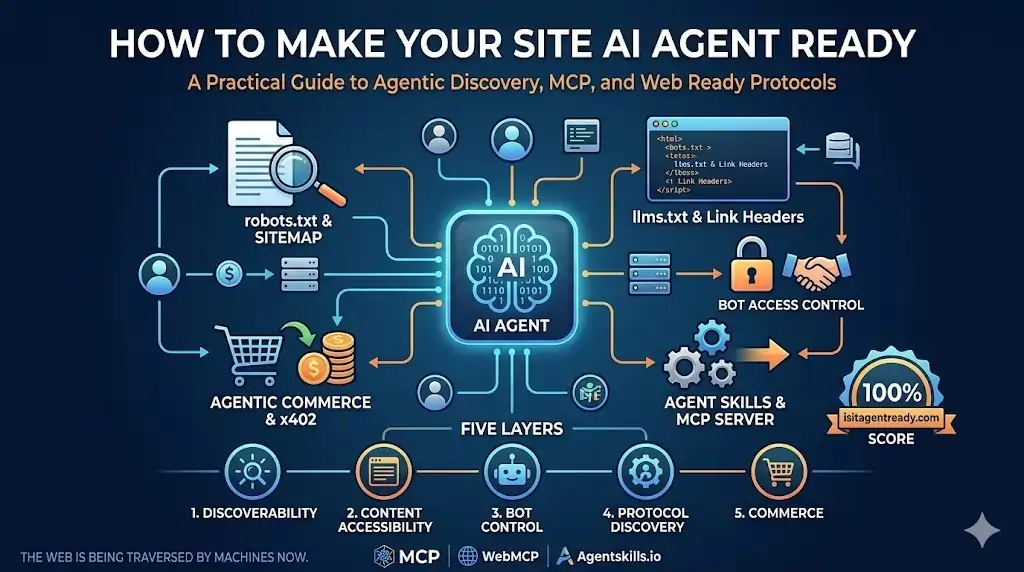
A new class of software is quietly hitting your servers. AI agent ready websites are no longer a niche concern — autonomous programs that browse the web, fetch structured data, authenticate, and take actions on behalf of real users are rapidly becoming first-class web consumers. Unlike a human opening a browser, an AI agent doesn’t read your landing page copy, click your nav bar, or care about your hero image. It wants structured data, predictable URLs, clear capability declarations, and protocols it recognises. Most websites aren’t ready for this yet. This guide walks through every technical layer you need to implement to change that.
Why “AI Agent Ready” Is a Real Standard Now
Search engine optimisation taught us that machines read your site differently than people do. Agent readiness is the next evolution of that idea — but with higher stakes. AI agents don’t just crawl for indexing. They read your content to answer user questions inside interfaces like ChatGPT, Claude, and Gemini; navigate to specific pages to retrieve live pricing or availability on demand; authenticate as users and take actions like booking, buying, and submitting when your site supports it; and in some cases pay for gated content autonomously.
The difference between a crawler and an agent is agency. An agent can do things, not just index things.
If your site isn’t exposing the right signals, agents will either fail silently, make wrong inferences, or skip you entirely in favour of a competitor whose site speaks their language. Agent readiness applies whether your site is a public content catalogue, a documentation hub, or a fully authenticated SaaS application. The patterns differ — but the value is equally high in both cases.
Layer 1: Discoverability
Before an agent can do anything on your site, it needs to find its way around. This layer is about making your site legible to autonomous clients from the very first request.
robots.txt — Still Relevant, More Important Than Ever
The classic robots.txt has gained new significance. Agents check it not just for crawl permissions but for signals about what kind of automated interaction is welcome. You can now differentiate between training crawlers and agentic clients — and should. A blanket Disallow: / for all bots will stop legitimate agents that respect robots.txt from ever getting started.
Sitemap with Timestamps
A well-structured sitemap.xml helps agents prioritise which pages are canonical and current. Keep it up to date and include <lastmod> timestamps. If your site uses locale-prefixed URLs (e.g. /en/, /en-us/), include all canonical variants. Agents can be confused by redirect chains — a root URL that 301s to a regional path loses context mid-flight.
HTTP Link Headers for Discovery
HTTP Link response headers are the modern way to advertise machine-readable resources alongside your HTML responses, without cluttering your markup. Each rel value tells an agent exactly where to look for something specific — it doesn’t have to guess or crawl, it reads the headers and follows the pointers.
Layer 2: Content Accessibility
Once an agent finds your site, can it actually read your content cleanly? HTML is designed for humans and browsers. It carries navigation menus, cookie banners, footer links, and decorative markup that an agent has to laboriously parse to reach the actual substance. On content-rich sites, the signal-to-noise ratio of raw HTML is genuinely poor.
Markdown Content Negotiation
The solution is to serve Markdown when an agent asks for it. This works through HTTP content negotiation: when a client sends Accept: text/markdown, your server returns clean Markdown instead of HTML. If you’re on a CDN or edge platform, handle this with a transform rule at the edge. On an app server, add middleware that checks the Accept header and renders Markdown instead of the full page template.
For help centres, product guides, and lookup tools, this is especially high-value. Agents reading your pages will be significantly more accurate when they receive clean Markdown. LLMs do not need your <header> tag.
Layer 3: Bot Access Control
Not all bots are equal. Training crawlers, agentic clients, and abusive scrapers are three very different things and deserve different policies.
Differentiating Bot Types in robots.txt
Training crawlers (such as GPTBot and GoogleOther) harvest content for model training. Agentic clients act on behalf of real users in real time, reading your content to answer their questions. You may want to allow agentic traffic freely while applying more careful rules to training crawlers. Keep up with user-agent strings published by major AI labs and update your robots.txt accordingly.
Content Signals
Cloudflare’s Content Signals proposal lets you attach machine-readable metadata to your content — licensing terms, intended use, and freshness signals — either in HTTP headers or a structured file at /.well-known/content-signals.json. This gives AI systems the context to make better decisions about whether and how to use your content, including respecting attribution requirements.
Web Bot Auth
Web Bot Auth is a challenge-response mechanism for verifying that an automated client is who it claims to be — a lightweight handshake that lets you distinguish legitimate agents from abusive scrapers even when they use similar user-agent strings.
Layer 4: Protocol Discovery — Skills, MCP, OAuth, and WebMCP
The previous layers are about visibility. This layer is about capability: what can an agent actually do with your site, and how does it discover that?
llms.txt — Your Site’s README for AI
llms.txt is a plain-text file at /.well-known/llms.txt (or /llms.txt) that describes your site to language models. Think of it as the README.md you write for AI consumers rather than human developers. A good llms.txt for a public content site describes your capabilities, your URL patterns, and — critically — whether authentication is required. Explicitly declaring no authentication is needed tells agents not to look for a login flow before they can read your content.
api-catalog — RFC-Correct API Discovery
The /.well-known/api-catalog endpoint (RFC 9727) returns a linkset — a structured JSON document that points to your API documentation and OpenAPI specs. Getting the Content-Type header right is not optional: scanners and agents validate the profile URI. Returning application/json instead of application/linkset+json means the file will not be recognised as a valid api-catalog.
Agent Skills — Structured Capability Declaration
Agent Skills (/.well-known/agent-skills/index.json) is a JSON standard for declaring what your site can do in a machine-readable format. Think of it as a schema-validated, structured companion to llms.txt. The current schema is v0.2.0. Each skill carries an id, type, name, description, url, optional url_pattern, documentation_url, sha256 integrity hash, and an auth_required flag.
The routing block is the most underappreciated field. Many sites use browser locale or geolocation to redirect the root URL to a language-specific path. Without this documented, an agent may construct the wrong URL, follow a redirect chain, lose the original URL context, and return broken links to the user. The routing block tells agents upfront: skip the root, use locale-prefixed URLs directly.
Agent Skills is already supported by Cursor, Gemini CLI, OpenHands, JetBrains Junie, Amp, and a growing list of AI coding and browsing agents.
OAuth 2.0 Discovery — Including the “No Auth” Declaration
This is the most misunderstood part of agent readiness for content sites. Publishing OAuth well-known endpoints explicitly declares your auth posture. An agent that finds no OAuth discovery documents has to guess: is auth required and just missing, or simply not needed? Ambiguity causes agents to either bail or attempt unnecessary auth flows. A clear declaration eliminates that entirely — even for fully public sites.
For a fully public content site, publish /.well-known/oauth-authorization-server with no_auth_required: true and public_access: true, with null values on all auth endpoints. Publish /.well-known/oauth-protected-resource with empty arrays on scopes_supported and bearer_methods_supported. Empty arrays are semantically meaningful — they explicitly declare that no bearer tokens are used, which is different from omitting the file entirely.
MCP — Model Context Protocol
MCP is the biggest protocol shift in this space. An open standard originally developed by Anthropic and now broadly adopted, MCP lets AI agents connect to your services the way USB-C connects devices: one universal interface, any client. An MCP server exposes your functionality as typed, schema-validated, documented tools that any MCP-compatible agent can discover and call. Advertise your MCP server via a Server Card at /.well-known/mcp-server-card.json.
An MCP-enabled site becomes directly callable by any MCP-compatible client — Claude, Cursor, Gemini CLI, OpenHands, and a growing ecosystem — without custom integration work on their end.
WebMCP — In-Browser Tool Registration
WebMCP is a newer standard, currently in early preview in Chrome, that lets your existing web pages register tools directly in the browser via the navigator.modelContext API. An AI agent browsing your site in a WebMCP-aware browser can discover and call your tools from within the page itself — no new server infrastructure required. The key correctness detail is using AbortController with a signal passed to every tool registration: when the page unloads, controller.abort() fires once and the browser automatically unregisters all tools. Without this, you get tool registration leaks across navigation.
Layer 5: Agentic Commerce
The frontier of agent readiness is transactions. If your site sells something or provides paid access to data, this layer is about making those flows accessible to agents acting autonomously.
x402 — HTTP Native Payments
x402 is a payment protocol built on HTTP. A server responds with 402 Payment Required and a machine-readable payment request. The agent settles the payment (typically via stablecoin) and retries with a payment proof header. The server verifies and serves the content. This means an agent can pay for a premium API response, a gated data export, or a one-off service call — entirely programmatically, with no UI involved.
Alongside x402, standards like MPP (Micropayment Protocol), UCP (Universal Commerce Protocol), and ACP (Agentic Commerce Protocol) are all emerging. x402 is the most mature at this point. Keep an eye on which standards your target AI clients adopt first.
Content Sites vs Authenticated Apps: The Two Patterns
| Concern | Public Content Site | Authenticated App |
|---|---|---|
| auth_required on skills | false for all skills | true for protected capabilities |
| oauth-authorization-server | no_auth_required: true, all endpoints null | Fully populated with real endpoints |
| oauth-protected-resource | Empty arrays (explicit declaration) | Populated scopes and bearer methods |
| MCP tools | Navigate to pages; return URLs and content | Call API with scoped user tokens |
| WebMCP tools | Navigate the browser to the relevant page | Pre-fill forms, trigger flows, read account state |
| Primary agent value | Information retrieval and navigation | Action execution on behalf of the user |
Many sites are a hybrid: public content pages and an authenticated app. Declare both clearly — auth_required: false for public tools and auth_required: true for protected ones. Agents will use what they can access and prompt the user to authenticate when needed.
Best Practices for AI Agent Readiness
Performance
- Serve
/.well-known/endpoints from a CDN or edge cache with longCache-ControlTTLs. Agents may poll these files repeatedly. - Implement Markdown content negotiation at the edge, not the origin, to avoid adding latency to agent reads of your most-content-heavy pages.
- Use
sha256hashes on Agent Skills documentation URLs so agents can skip re-fetching files that haven’t changed.
Security
- Never expose internal API endpoints or admin paths in your Agent Skills or MCP Server Card. Declare only what you intend to be agent-accessible.
- Implement Web Bot Auth for any endpoints where you need to distinguish legitimate agents from abusive scrapers.
- For authenticated apps, follow OAuth 2.0 best practices strictly — use PKCE, short-lived access tokens, and refresh token rotation.
Accuracy and Maintenance
- Keep
updatedtimestamps in your Agent Skills index accurate — stale timestamps mislead agents about how fresh your capability declarations are. - Update
robots.txtas major AI labs publish new user-agent strings. - Write per-skill Markdown documentation files (
documentation_url) with valid parameter values, example requests, edge cases, and rate notes. These are richer than the index alone and can be updated independently.
Accessibility and SEO
- Agent readiness and human SEO are complementary, not competing. Clean semantic HTML, proper heading hierarchy, and structured data benefit both.
- Structured data (JSON-LD) for products, articles, and FAQs gives agents an additional structured layer alongside HTML and Markdown.
- Ensure your sitemap includes all locale and region variants — agents navigating locale-specific URLs should never hit unexpected 404s.
Common Mistakes to Avoid
Blanket Bot Blocking
A Disallow: / for all user-agents in robots.txt blocks agentic clients alongside abusive scrapers. Differentiate between training crawlers and agentic clients explicitly. Blocking ClaudeBot or GPTBot when those represent agentic traffic to your paying users is a self-defeating policy.
Omitting Well-Known Endpoints Entirely
Not publishing OAuth well-known endpoints because “we don’t have a login system” is the most common content-site mistake. Omitting these files leaves the agent guessing about your auth posture. An explicit no_auth_required: true declaration takes 10 minutes to publish and eliminates a common agent failure mode entirely.
Wrong Content-Type for api-catalog
Returning application/json instead of application/linkset+json; profile="https://www.rfc-editor.org/info/rfc9727" causes scanners and agents to reject your api-catalog as invalid. The profile URI is required — not optional.
Missing Routing Block in Agent Skills
If your site root redirects to a locale path, agents will construct wrong root URLs, follow redirect chains, lose context, and return broken links to users. The routing block in Agent Skills is not optional for multi-locale sites — it is the fix for this.
WebMCP Without AbortController Cleanup
Registering WebMCP tools without passing an AbortController signal causes tool registration leaks across navigation. Every registerTool call must receive the same signal, and the controller must abort on page unload. This is the single most important correctness detail in a WebMCP implementation.
Stale Sitemap Without Timestamps
A sitemap without <lastmod> timestamps gives agents no signal about content freshness. Agents prioritising pages to re-read will treat all your content as equally stale. Keep timestamps accurate and automate their update as part of your content publishing pipeline.
Implementation Checklist
Quick Wins (A Few Hours)
- Review and update
robots.txtwith explicit AI agent rules - Add
sitemap.xmlwith<lastmod>timestamps and all locale/region variants - Create
/llms.txtwith a plain-language description of your capabilities and URL patterns - Add
Linkheaders to HTTP responses advertising your well-known endpoints
Medium Effort (A Day or Two)
- Create
/.well-known/agent-skills/index.json— include routing,url_patterns,supported_locales, and per-skill sha256 hashes - Write per-skill Markdown documentation files referenced by
documentation_url - Implement
/.well-known/api-catalogwith correctContent-Type: application/linkset+json; profile="..." - Publish
/.well-known/oauth-authorization-server— real auth server or explicit “no auth” declaration - Publish
/.well-known/oauth-protected-resource— even with empty arrays, the explicit declaration matters - Implement Markdown content negotiation on key content pages
Larger Investment (Ongoing)
- Build and deploy an MCP server exposing your core tools
- Create
/.well-known/mcp-server-card.json - Add WebMCP tool registration via
navigator.modelContextto key page templates, with AbortController cleanup and server-injected locale/template context - Write
auth.mddocumenting your OAuth scopes if applicable - Evaluate x402 for any pay-per-use content or API endpoints
Summary and Next Steps
The web is becoming multi-agent. Search engines taught us to write for both humans and crawlers. The next few years will teach us to design for both humans and agents. The changes are largely additive — you’re publishing new well-known endpoints, adding HTTP headers, and shipping a small JavaScript snippet. You’re not rebuilding your site.
The pattern is clear whether you run a public content site or an authenticated app: declare your capabilities explicitly, and agents will use them correctly. The sites that do this now will be the ones agents naturally reach for. The rest will be invisible to an increasingly large share of automated web traffic.
Key Takeaways
- Agent readiness has five layers: discoverability, content accessibility, bot access control, protocol discovery, and agentic commerce.
- Content-only sites need agent-readiness work just as much as authenticated apps — the patterns are different but the value is equivalent.
- Explicitly declaring “no auth required” via OAuth well-known endpoints is critical for public sites, not just sites with login flows.
- WebMCP enables in-browser tool registration with no new server infrastructure — but requires AbortController cleanup to be correct.
- Start with
llms.txtandrobots.txt. Build from there.
Actionable Next Steps
- Run your domain through isitagentready.com to get a per-layer pass/fail breakdown today.
- Publish
/llms.txtand updaterobots.txtthis week — these are the fastest wins. - Schedule time to implement Agent Skills and OAuth well-known endpoints within the next sprint.
- Follow the MCP specification at modelcontextprotocol.io as the protocol continues to evolve.
Suggested Internal Links
- How to Optimise Your WordPress robots.txt for SEO and Bots
- WordPress Structured Data: Complete JSON-LD Implementation Guide
- How to Add Custom HTTP Headers in WordPress
- REST API in WordPress: A Developer’s Complete Guide
- WordPress Multisite and Multilingual: Managing Locale-Based URL Structures
Recommended External Resources
- isitagentready.com — Free agent readiness scanner by Cloudflare
- modelcontextprotocol.io — Official MCP specification
- agentskills.io — Agent Skills standard and schema reference
- webmachinelearning.github.io/webmcp — WebMCP specification
- developers.cloudflare.com/agents — Cloudflare Agents documentation
- RFC 9727 — API Catalog (IETF)
- RFC 8414 — OAuth 2.0 Authorization Server Metadata